
I have found a useful bit of tech to help me with remote working out and about and also working from home on my small desk! The Duex Float portable monitor! This has been making waves in the tech world, promising to revolutionise the way people work on their laptops. The innovative device attaches directly to a laptop screen, creating a seamless dual-display setup that can be used anywhere. In this blog post today, I’m sharing my Duex Float review, so you can find out if this one is for you!
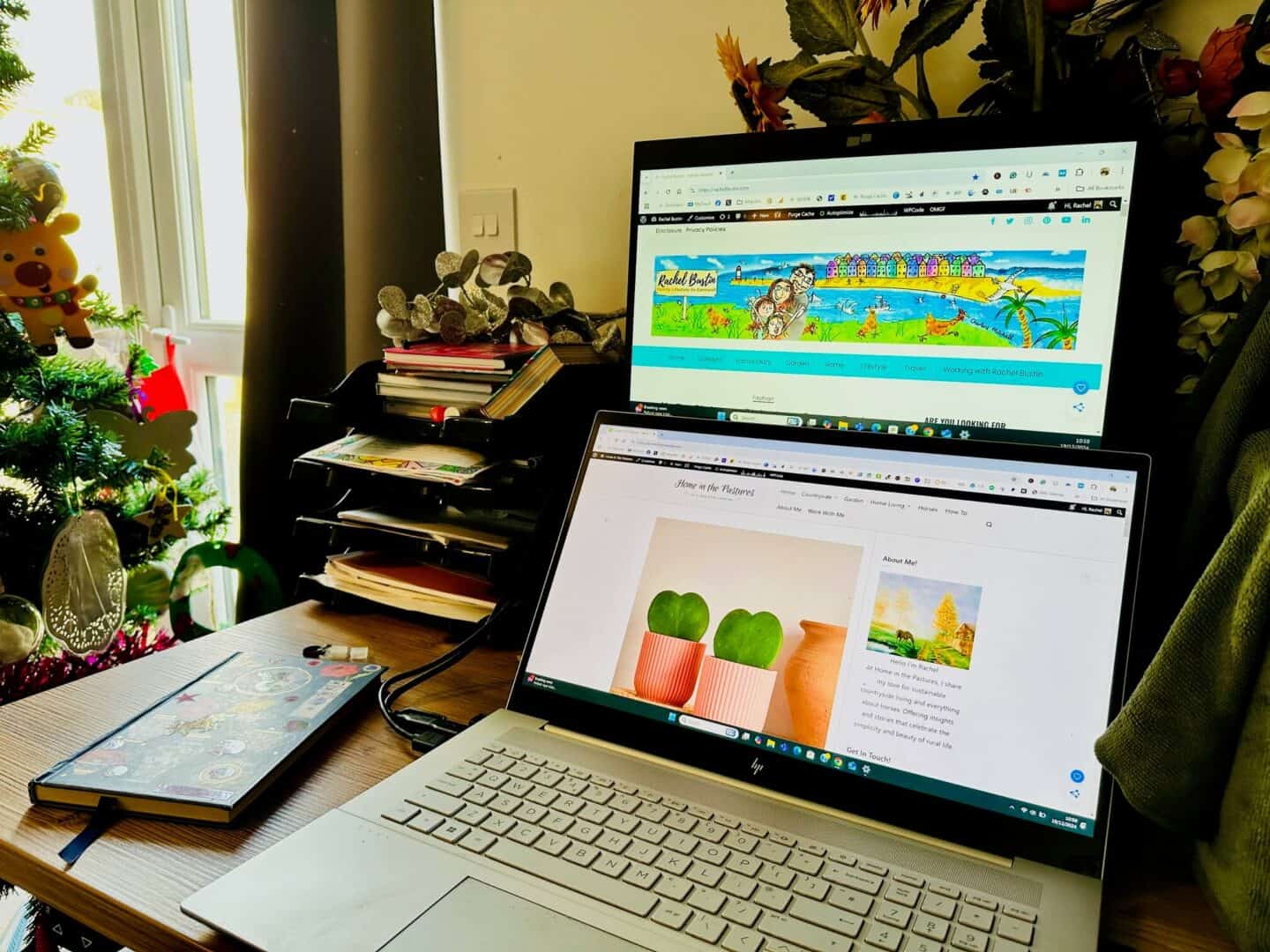
The Duex Float’s 15.6-inch 1080p touchscreen offers a significant boost to productivity, allowing users to effortlessly multitask and manage multiple windows with ease!
Imagine the excitement of unboxing this sleek gadget from Mobile Pixels and attaching it to your laptop for the first time. The Duex Float’s organic design blends seamlessly with most laptops, and its versatile viewing modes – dual screen, presentation, and desktop – cater to various work scenarios. Whether you’re a coder, a digital nomad, or simply someone who craves the extra screen, this portable monitor aims to be a game-changer.

While the Duex Float boasts impressive features, it’s worth noting that it may not be compatible with all laptop models. It’s best to check before you buy.
Design and Aesthetics
The Duex Float boasts a sleek, modern design that seamlessly integrates with laptops and gives you a second monitor. Its innovative features enhance both form and function, offering users a versatile and stylish portable monitor solution.
Colour and Appearance of the Screen
The portable screen sports a sophisticated black finish that complements most laptop designs. Its 15.6-inch display features slim bezels, maximising screen space whilst maintaining a compact footprint. The monitor’s IPS panel delivers vibrant colors to match the color of your screen, and wide viewing angles, ensuring crisp visuals from various positions.
The screen’s anti-glare coating reduces reflections, making it suitable for use in diverse lighting conditions. At just 0.87 inches thick, the Duex Float maintains a slim profile when attached to a laptop, preserving portability and great if you are working in a cafe!
Built-in Kickstand and Stacked Design
A standout feature of the Float monitor is its ingenious built-in kickstand. This thoughtful addition allows users to position the monitor at various angles, catering to different ergonomic preferences.
The stacked dual-screen configuration is particularly noteworthy. Users can effortlessly attach the Float to their laptop screen, creating a vertical stack that expands screen real estate without increasing desk footprint. This design proves invaluable for multitasking and productivity-focused workflows.
Optional Magnets for Versatility
Duex Float’s design incorporates optional magnets, adding another layer of versatility to its mounting options. These magnets provide a secure, non-permanent attachment method for users who prefer not to use adhesive solutions.
The magnetic system allows for quick attachment and detachment, making it easy to switch between single and dual-screen setups. This feature is particularly useful for professionals who frequently move between workspaces or need to quickly pack up their setup for travel!
The magnets are discreetly integrated into the design, maintaining the monitor’s sleek aesthetic whilst providing robust support for the stacked configuration.
Compatibility and Integration
The Float offers versatile compatibility across various devices and platforms. Its integration capabilities extend to larger laptops, gaming consoles, and different connection types, enhancing its appeal to diverse users.
Support for 16-Inch Laptops
It can accommodate 16-inch laptops with ease, catering to users who prefer larger screens for their work or entertainment needs. Its design allows for seamless attachment to these larger devices without compromising stability or functionality. The monitor’s lightweight construction ensures it doesn’t add significant bulk to the laptop setup, maintaining portability. The stand on the monitor is very sturdy so is great for standing behind my larger screen.
Users of 16-inch MacBook Pros or similar-sized Windows laptops will find the Float a suitable companion. The monitor’s adjustable viewing angles complement these larger screens, providing an ergonomic dual-display setup that’s particularly beneficial for multitasking professionals or creative individuals working with expansive visual content.
HP Envy laptop 17 inch screen Compatability
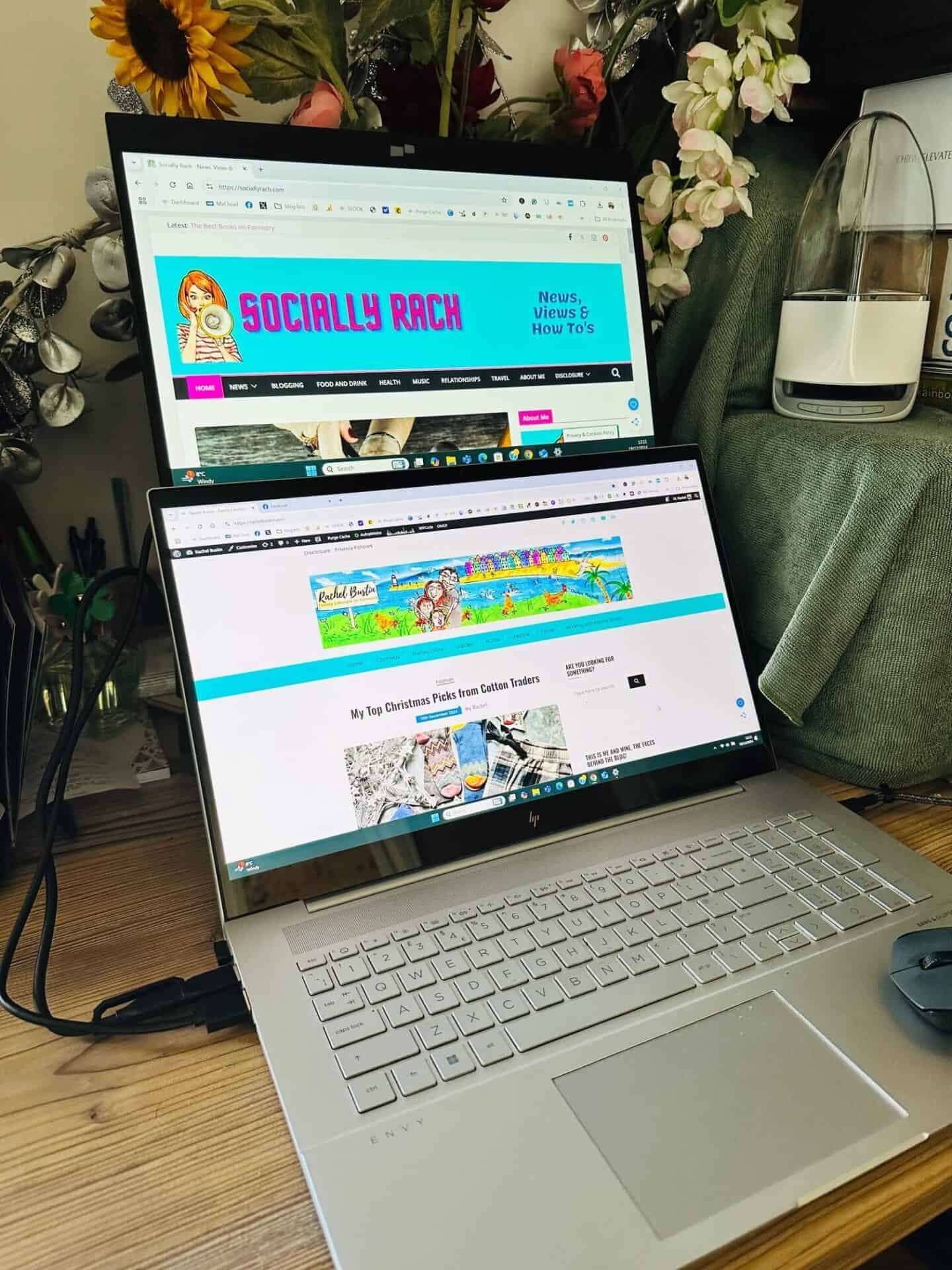
Compatibility extends to even larger laptops like my HP Envy with its 17-inch screen. The Duex Float’s versatile mounting system adapts well to this size, offering a balanced dual-screen experience. Users of the HP Envy can enjoy an extended workspace without sacrificing desk space or portability.
The monitor’s resolution and color accuracy pair nicely with the HP Envy’s display, ensuring a consistent visual experience across both screens. This compatibility is especially useful for tasks that require ample screen real estate, such as data analysis, video editing, or complex design work.
Nintendo Switch Connectivity
Gaming enthusiasts will appreciate the Float’s compatibility with the Nintendo Switch. This feature transforms the portable gaming experience, offering a larger screen for multiplayer sessions or more immersive single-player gameplay. The monitor connects easily to the Switch’s dock, providing a plug-and-play solution for gamers on the go.
Its portable nature complements the Switch’s handheld design, making it an ideal travel companion for gamers. Its quick setup and lightweight build mean users can enjoy big-screen gaming in various settings, from hotel rooms to friend’s houses, without the need for a TV.
USB-C Port Utilisation
The Float maximises the potential of USB-C connectivity. This versatile port handles video, audio, and power transmission through a single cable, simplifying the setup process. The monitor’s USB-C compatibility ensures broad device support, including laptops, tablets, and smartphones that feature this modern connection standard.
For devices with USB-C ports, the Duex Float offers a streamlined experience:
- Power delivery: Supports charging compatible devices while in use
- Plug-and-play functionality: Eliminates the need for additional drivers or software
- Daisy-chaining capability: Allows for connecting multiple devices in series
This USB-C integration enhances the Float’s appeal as a flexible, future-proof solution for users seeking a portable, multi-purpose display.
Display and Visual Features
The Float boasts impressive display capabilities that enhance productivity and visual experience. Its high-quality screen and touch functionality offer versatility for various work scenarios.
Touchscreen LCD Display
It features a responsive touchscreen LCD display, adding a new dimension to user interaction. This touch-sensitive screen allows for intuitive navigation and control, making it ideal for presentations and creative tasks. Users can effortlessly scroll, zoom, and manipulate content with their fingertips, mimicking tablet-like functionality.
The touchscreen capability proves particularly useful for digital artists and designers. It enables direct input for sketching, photo editing, and other graphic-intensive work. Moreover, the touch feature facilitates easy navigation through documents and web pages, enhancing overall workflow efficiency.
1080p Resolution for Clarity
With its crisp 1080p resolution, the Duex Float delivers sharp and clear visuals. This Full HD display ensures that text, images, and videos appear vivid and detailed, reducing eye strain during extended use. The high pixel density contributes to improved readability, making it easier to work with spreadsheets, documents, and intricate designs.
The 1080p resolution also proves beneficial for multimedia consumption. Whether watching videos or editing photos, users can appreciate the enhanced colour reproduction and contrast. This level of clarity is particularly valuable for professionals who require precise visual representation in their work.
User Experience and Ergonomics
It offers innovative solutions to enhance comfort and reduce physical strain during extended laptop use. Its thoughtful design addresses key ergonomic concerns for mobile workers and students alike.
Ergonomic Alignment for Comfort
The Float’s adjustable positioning allows users to create an optimal ergonomic setup. By attaching to the laptop’s lid, it elevates the secondary display to eye level. This alignment helps maintain proper posture and reduces the need to hunch over.
Users can fine-tune the screen’s angle and height to suit their individual needs. The device’s lightweight construction makes it easy to adjust on the fly. Its versatile mounting system works well on various laptop sizes, ensuring a snug fit.
The useful Float takes up minimal desk space compared to traditional external monitors. This compact footprint is ideal for cramped workspaces or frequent travellers.
Reduced Eye and Neck Strain
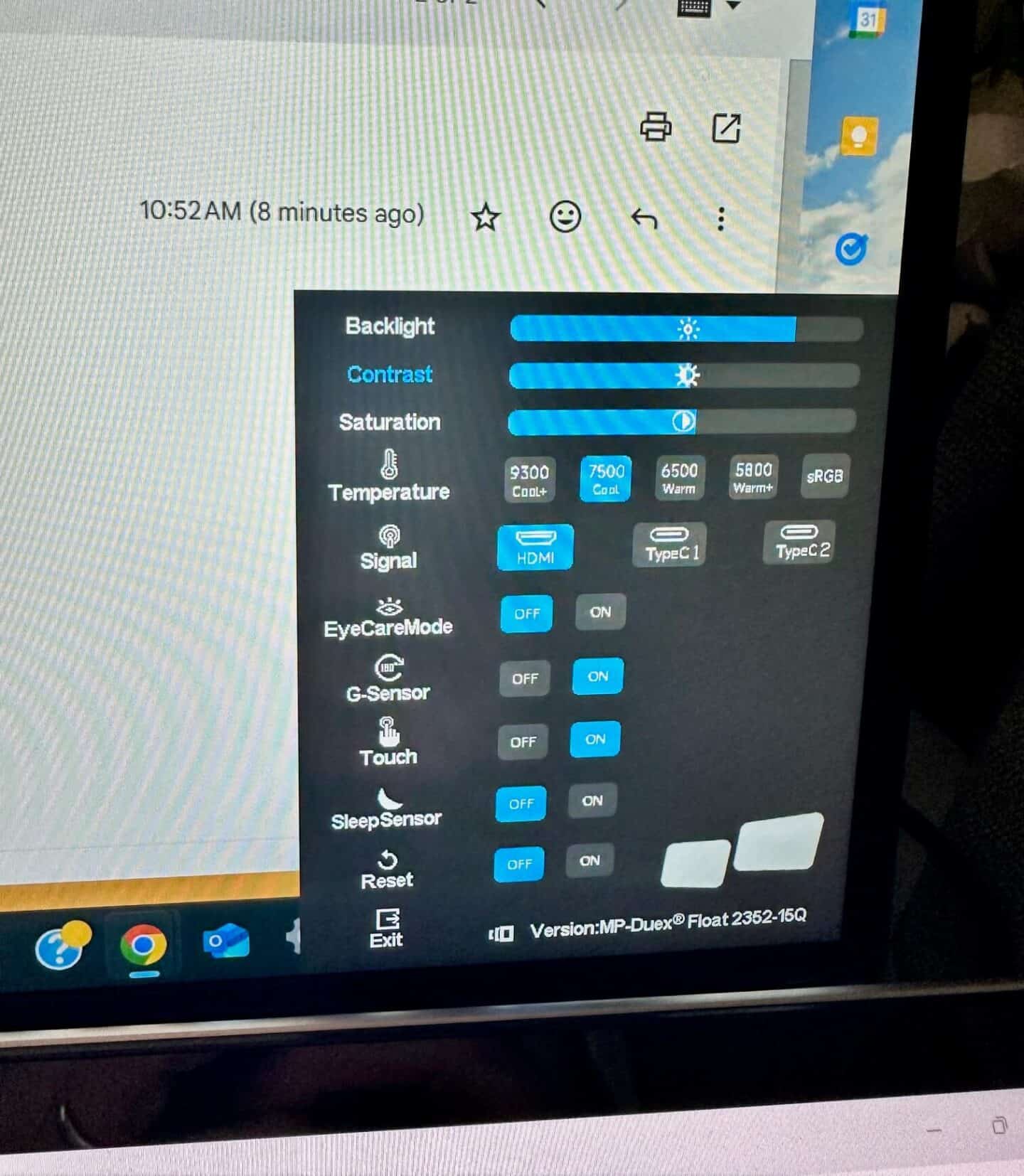
The 1080p touchscreen display features customisable colour settings. Users can adjust brightness and colour temperature to reduce eye fatigue during long work sessions or late-night use.
Its proximity to the main laptop screen minimises constant head turning. This design helps prevent neck strain often associated with dual-monitor setups. The seamless transition between displays allows for a more natural workflow.
The screen’s anti-glare coating further reduces eye strain in bright environments. Users can comfortably work outdoors or in well-lit offices without squinting.

Functionalities for Productivity
The portable monitor offers versatile features that boost productivity across various work scenarios. Its adaptable design supports late-night projects, enhances presentations, and streamlines daily tasks whilst on the move.
Conducive to Late-Night Projects
The Float’s eye-friendly display proves invaluable for nocturnal work sessions. Its adjustable brightness settings allow users to fine-tune the screen for optimal visibility in low-light conditions. The monitor’s blue light filter helps reduce eye strain during extended use, making it easier to focus on important tasks well into the night.
For developers and designers burning the midnight oil, the extra screen is a game-changer. It allows for seamless code editing on one screen whilst running tests or previewing changes on the other. This dual-screen setup minimises the need for constant tab-switching, keeping workflow smooth and efficient.
Enhancements for Work Presentations
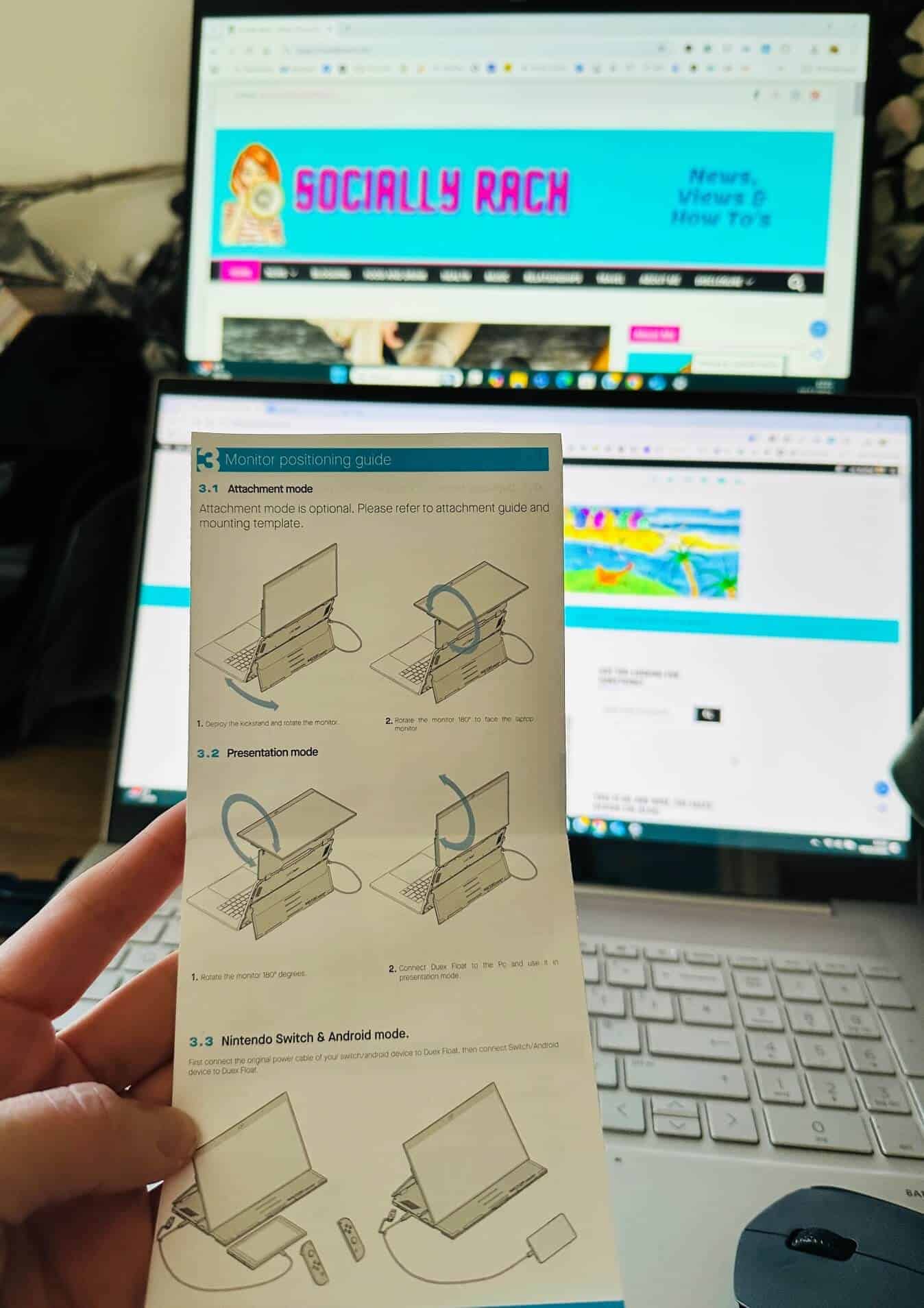
When it comes to delivering impactful presentations, the Float shines. Its versatile viewing modes offer flexibility for various presentation styles. The presentation mode allows users to mirror their laptop screen, facing the audience whilst maintaining control of their content.
For collaborative sessions, the touchscreen functionality enables interactive demonstrations. Presenters can easily annotate slides or manipulate data in real-time, fostering engagement and clearer communication of ideas. The portability factor means presenters can set up quickly in different meeting rooms or client offices without hassle.
Facilitating Everyday Work and Travel
The Duex Float seamlessly integrates into daily work routines, whether in the office or on the go. Its plug-and-play nature means users can quickly expand their workspace without the need for complex setups or additional drivers.
For remote workers and digital nomads, the monitor’s lightweight design makes it an ideal travel companion. It easily fits into most laptop bags, allowing users to maintain a dual-screen setup in cafes, co-working spaces, or hotel rooms. The ability to switch between landscape and portrait orientations accommodates various tasks, from spreadsheet analysis to document editing.
The monitor’s compatibility with a wide range of devices, including smartphones, further enhances its utility for mobile professionals. This versatility ensures users can maximise productivity regardless of their location or primary device.
Modes and Configurations
The Float offers versatile setups to enhance productivity and presentation capabilities. Its innovative design allows users to adapt the screen to various work scenarios effortlessly.
Desktop and Presentation Modes
Desktop Mode transforms any workspace into a dual-screen powerhouse. Users can extend their laptop’s display horizontally, creating a seamless multi-monitor experience. This setup is ideal for multitasking, comparing documents side-by-side, or managing multiple applications simultaneously.
Presentation Mode flips the Duex Float 180 degrees, facing the audience. This configuration is perfect for client meetings, classroom settings, or collaborative work sessions. It eliminates the need for external projectors or additional hardware, making impromptu presentations a breeze.
Both modes are easily accessible with a simple adjustment, allowing users to switch between configurations in seconds.
Stacked Screen for More Power
The stacked design is where the Float truly shines. By positioning the screen directly above the laptop’s display, users can create a vertical dual-monitor setup. This configuration is a game-changer for those who work with long documents, coding interfaces, or social media feeds.
The stacked mode reduces neck strain by keeping both screens in the user’s natural line of sight. It’s particularly beneficial for remote workers who need to maximise productivity in limited spaces. The compact vertical arrangement is perfect for coffee shops, co-working spaces, or cramped home offices.
With its lightweight design and sturdy attachment mechanism, the Float remains stable in all configurations, ensuring a reliable and consistent user experience.
Technical Specifications
The Duex Float boasts impressive specs that set it apart from other portable monitors. Its large display and thoughtful design cater to professionals seeking enhanced productivity on the go.
Dimension of the Portable Screens
The Duex Float features a generous 15.6-inch touchscreen display with a full HD resolution of 1920 x 1080 pixels. This sizeable screen offers ample space for multitasking and content creation. The monitor measures 14.2 inches in width, 9.1 inches in height, and 0.87 inches in thickness.
Despite its large screen, the Duex Float remains relatively portable, weighing approximately 4 pounds. This makes it a bit heavier than some other portable monitors, but the trade-off is a larger, more versatile display.
The screen boasts a 60 Hz refresh rate, ensuring smooth visuals for most work-related tasks. With a maximum brightness of 250 nits, it provides adequate visibility in various lighting conditions.
Power Requirements and Efficiency
The Duex Float is designed for convenience and efficiency in power consumption. It connects to laptops via USB-C, which not only transmits video signals but also powers the device.
The monitor features two USB-C ports with pass-through charging capability. This clever design allows users to power both their laptop and the Duex Float using a single power source, reducing cable clutter.
For devices without USB-C video output, the Duex Float includes a mini-HDMI port. However, when using HDMI, a separate power connection is required.
The monitor’s power efficiency is noteworthy, drawing minimal power from the connected laptop. This helps extend battery life during mobile use, a crucial factor for professionals working on the go.
Final Thoughts
Mobile Pixels Duex Float is proven to be a game-changer for people like me! Its innovative design allows users to effortlessly create a dual-screen setup anywhere, boosting productivity and streamlining workflows. I love the stackable touchscreen display!
The portable monitor’s versatility shines through its three viewing modes: dual screen, presentation, and desktop. This flexibility caters to various work scenarios, from intense coding sessions to client presentations!
While the 15.6″ touch screen may seem modest compared to larger standalone monitors, its portability more than makes up for the size. The seamless integration with most laptops is a testament to Mobile Pixels’ thoughtful engineering!
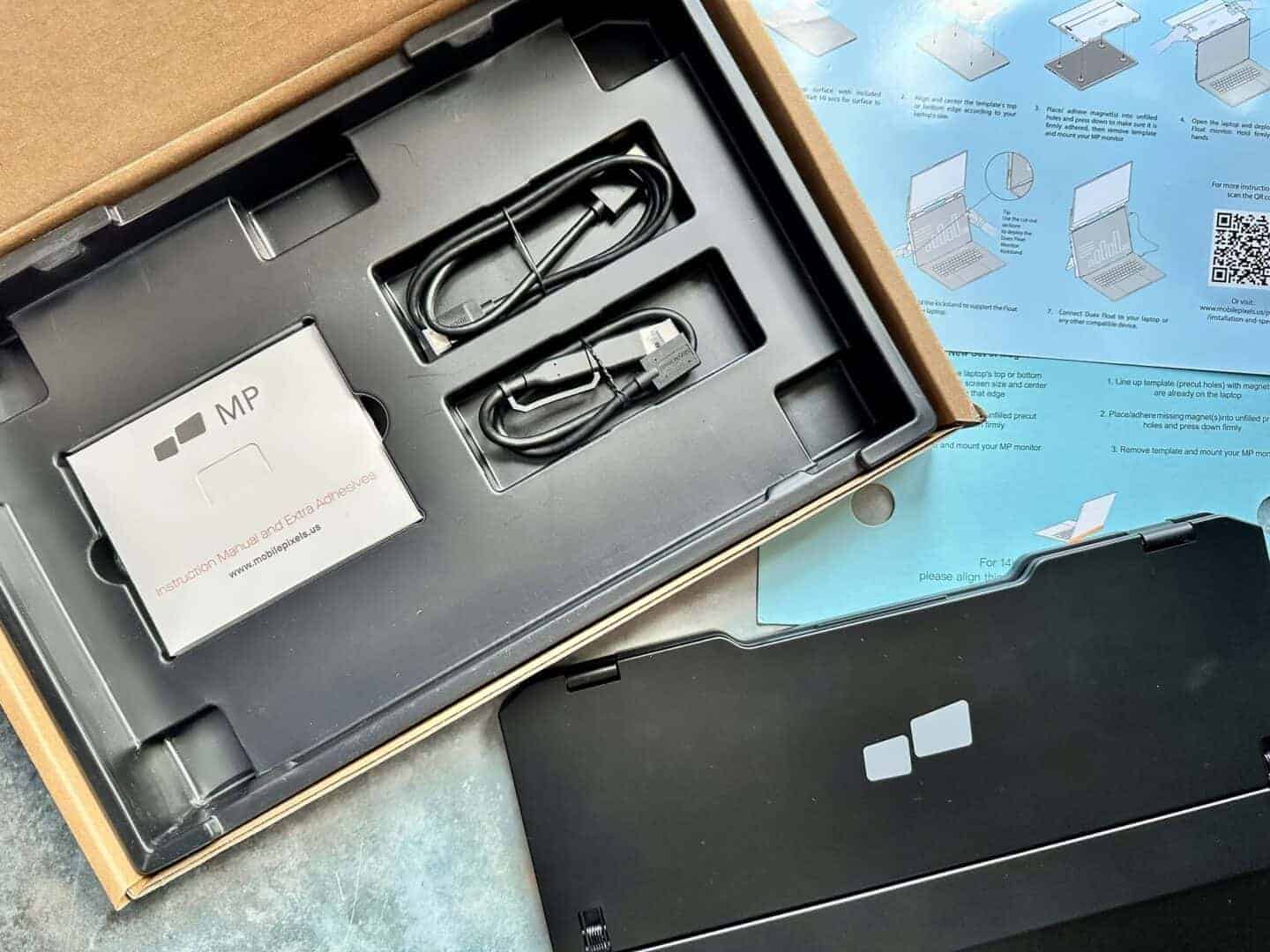
The Duex Float is perfect for its stylish look and easy attachment process. The included accessories, such as the USB-C cable and magnetic plates, further enhance its user-friendly nature.
I’m now finding it indispensable for my daily work routine. I can be writing blog posts on one screen while having my emails open on the other!
For those seeking to optimise their mobile workspace, while using less space, the Duex Float offers a great solution. It’s a brilliant example of how innovative technology can simplify and enhance our professional lives! Highly recommend!